Feedly
On the web, go to feedly.com/i/opml and download your OPML (the phone app has no export). Or open Organize Sources from the gear next to Feeds. Muuted vs Feedly →
Switching from Feedly, Inoreader, NewsBlur, Feedbin or Readwise Reader takes one file and one tap. Leaving takes the same. Your subscriptions are yours, in the standard format every RSS reader understands.
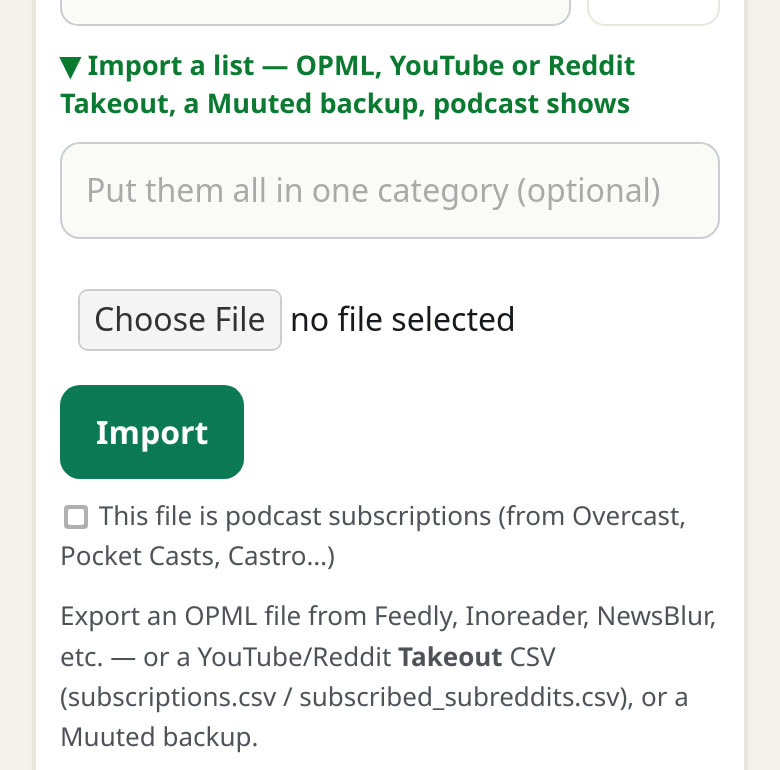
Feeds you already follow are skipped, so importing the same file twice never doubles anything. The free plan holds 100 sources; if a file has more, Muuted imports up to the limit and says how many it skipped.
Most readers export an OPML file, the standard list of feed addresses. Here is where to find it, and what does and does not come with it.
On the web, go to feedly.com/i/opml and download your OPML (the phone app has no export). Or open Organize Sources from the gear next to Feeds. Muuted vs Feedly →
Preferences › Import/Export, then Export. You get an .opml file of every subscription.
Signed in on the web, go to newsblur.com/import/opml_export and the OPML downloads.
Settings › Import/Export holds both the importer and your OPML download.
On your Account page, under Export account data, choose Export Feeds as OPML. Or search the command palette for Generate OPML export. Muuted vs Reader →
No export exists. Apple News is not an RSS reader and keeps your follows to itself. Most publishers there have a website with a feed: paste each site's address into Feed Rules and Muuted finds it.
Every feed address in the file becomes a Muuted source, with its name.
OPML folders are not copied as-is. Muuted picks a category for each feed from its name, or puts the whole file in the one category you type. You can move sources between categories afterwards.
OPML is a list of feeds, nothing more. Starred items, read history, tags and rules from your old reader do not travel in it, from any app.
A feed that only works while you are signed in somewhere else will import but will not load here, and addresses on a private network are skipped. Public feeds, YouTube channels and podcasts all come across.
Every channel you subscribe to comes across from a Google Takeout file, and new videos land in your Video tab with no recommendations. Import your YouTube subscriptions, step by step →
Your shows come across as an OPML from whatever app you use now and land in your Podcasts tab. Where Overcast, Pocket Casts, Apple Podcasts, Spotify and the rest keep their export →
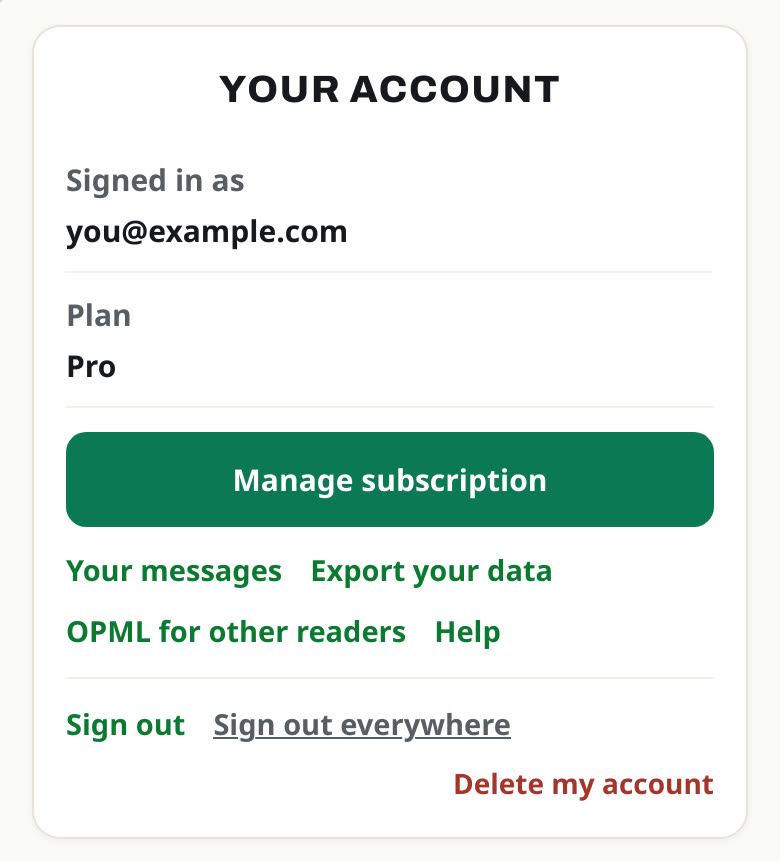
muuted-subscriptions.opml: every source, grouped by your categories. Any RSS reader can import it.muuted-backup.json: your sources with their categories, your muted words (a temporary mute keeps its time left) and your always-show words.Nothing to request and nothing to wait for. The download starts when you tap.
Open the menu, tap Feed Rules, then Sources. Open Import a list, choose your .opml file and tap Import. Every feed in the file becomes a source.
Not as folders. Muuted files each feed into a category it picks from the feed's name. If you would rather keep a batch together, type a category name in Put them all in one category before you import.
Apple News has no export, so there is no file to bring. Most publishers you follow there have a website with a feed: paste each site's address into Feed Rules and Muuted finds the feed.
Nothing doubles. Any feed you already follow is skipped, so importing again only adds what is new.
Open the menu and tap Account. OPML for other readers downloads your subscriptions as a standard OPML file, grouped by category, that any RSS reader can import.
Your sources with their categories, your muted words, including how long a temporary mute has left, and your always-show words. Import the backup file into any Muuted account to restore them.
Start with 100 sources and 10 muted words free. Founding Pro is $4/mo or $36/yr — later $5/mo · $50/yr.